
Low-cost RPA that your own staff build — no engineers required.
Hand the work that repeats every day to MICHIRU RPA, and give your people back the hours for the work only people can do — judgement, ideas, customers. Anyone can build it: you click, you don’t program.
Three reasons efficiency projects stall — and what changes.
Routine PC tasks fill the day, so nobody gets to the work that actually moves the business.
The routine runs on its own. The hours come back and go somewhere useful.
Rebuilding or modifying the existing system to make it efficient is a major project.
Keep the systems you have. The robot operates them exactly as your staff do.
You bought RPA once, found scenario-building too hard, and never used it properly.
Simple commands, plus our team beside you — from choosing tasks to building the scenario.
Cheap to run. Simple enough that beginners build their own automations.
A fraction of enterprise RPA
One monthly licence covers every feature — no separate developer or designer licence, no minimum of two seats, no annual lock-in. A single licence connects up to five PCs, shared across your team.
No engineer in the loop
Scenarios are assembled from the same actions you perform by hand — click, type, launch a file, repeat. No programming knowledge, no integrator, no change request. Staff on the floor learn it quickly and fix their own scenarios afterwards.
Works with all software
MICHIRU reads what is displayed on screen rather than plugging into an API. If a person can operate it, the robot can too — ERP systems, browsers, SaaS and in-house tools alike.
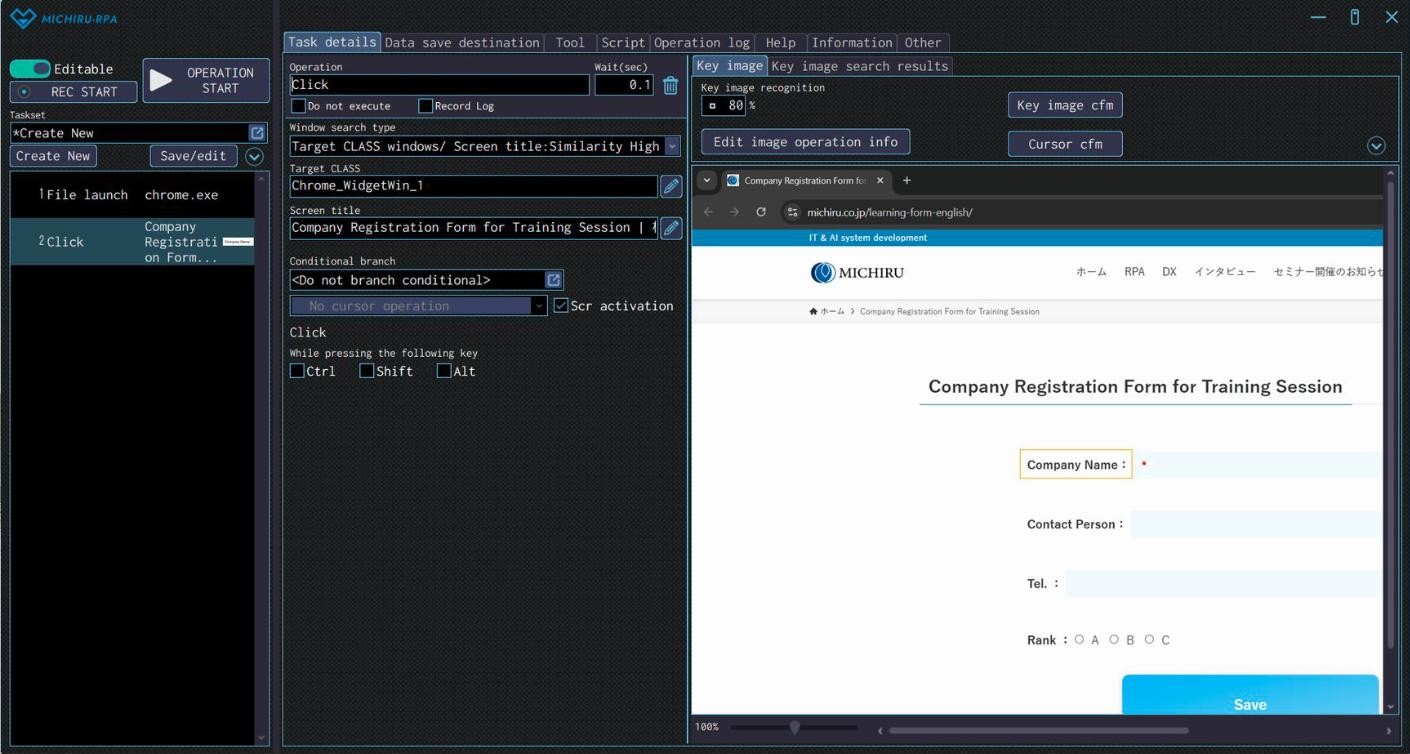
A scenario is a stack of ordinary operations.
Each operation is one registered action — launch a file, click, enter text. Stack them in order and you have a complete procedure that runs top to bottom.
Select an operation
Pick from the menu: click, text input, file move, repeat, condition branching, string manipulation, Excel operation, error handling.
Configure the details
Set the position of the operation, the file path, the text to enter, variables and conditionals. Settings differ per operation type.
Record the screen
Capture the screen you want to operate and set the key image and cursor position. The robot then finds that target every run.
Operation list
Everything already created, in run order. Add, reorder or group operations here.
Task details
Where each operation is configured — wait time, target window, conditional branching, modifier keys.
Key image editor
Point at what to click or type into by setting a reference image and cursor position.
Two automations, running every day
Updating measurement data
Data is collected from a measuring device twice a day to monitor production trends.
Shipping instructions
A week of shipping instructions is created and printed every morning.
How MICHIRU differs from the other RPA tools
Comparison based on publicly available vendor terms. Commercial terms are shared on request.
What users tell us
“It's our first time trying RPA, but MICHIRU RPA is intuitive and user-friendly.”
“Because our employees can create the automation set by themselves, the way of working has changed for the better.”
“The UI is easy to understand, so it's rather stress-free to use.”
“Work efficiency has improved significantly after we implemented MICHIRU RPA.”
Engineers who implement it with you.
You don’t need an engineer to use MICHIRU RPA — but ours are available anyway. From choosing which tasks to automate to building the first scenarios, our engineers implement alongside your team.
Talk to an implementation engineerEngineer-led implementation
Our engineers survey the process with you, build the first scenarios, and hand them over in a form your own staff can edit afterwards. Remote or on site, in English.
Email and chat support
Help with creating scenarios, fixing errors, or anything else. A specialist replies within two business days.
Regular training sessions
Held regularly and free to join — after you implement, and again whenever new people join the team.
Help Center, always open
Function explanations plus the techniques and tricks that make scenario-building faster.
Four steps to implementation
Inquiry
Reach out through the form. A representative reviews it and gets back to you.
Meeting
We introduce the product and ask about your work. Still undecided is perfectly fine.
Trial
One month, no restrictions, no cost — with support from choosing tasks to building scenarios.
Contract
Fill in the application form to move to a full licence. Everything built during the trial carries over.
Frequently asked
Can MICHIRU RPA be used on a Mac?
Mac is not supported. MICHIRU RPA runs on Windows 10 or later.
Does it need an internet connection?
Standard licences authenticate online. There are licence types that work in offline environments — tell us about your setup and we’ll advise.
Can we use the PC while the robot is running?
No — the robot operates the screen, so it needs the machine to itself. We recommend a dedicated PC for running scenarios.
Can scenarios run on a schedule?
Yes. Use Windows Task Scheduler, which is included with Windows by default, to run a scenario at a fixed time each day.
How does the contract term work?
Contracts renew monthly. If you would prefer an annual term, let us know and we’ll arrange it.
Try it for a month. Keep everything you build.
The trial licence is free and comes with no restrictions. If you sign, every scenario you created during the trial transfers straight over.